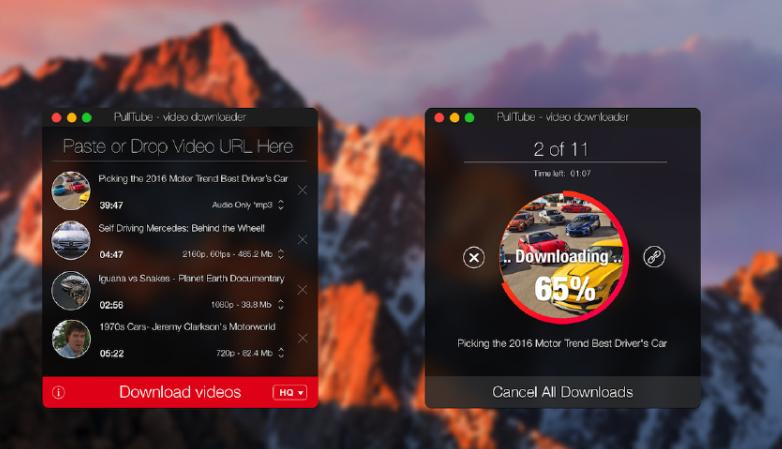
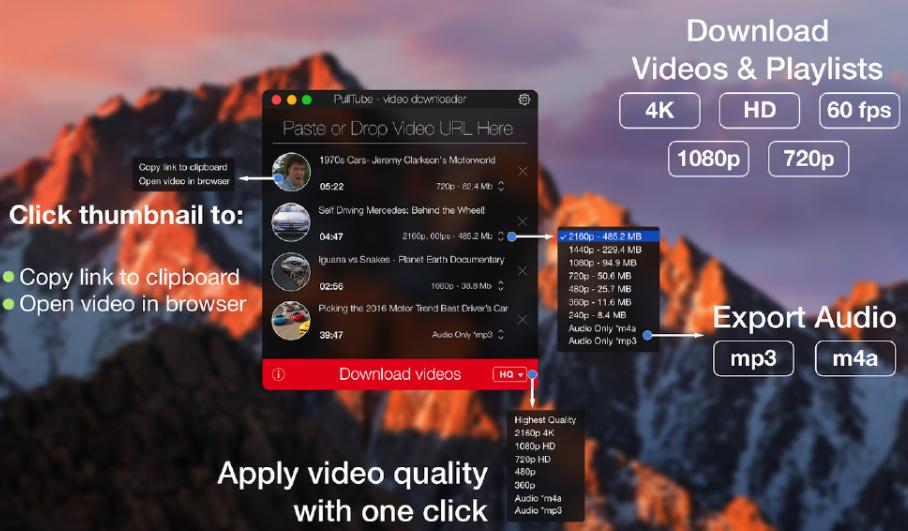
PullTube is an online video download tool for macOS platform,可以帮助我们下载油管以及Vimeo的在线视频到本地
YOUTUBE和VIMEO 支持Youtube和Vimeo。 Add more platforms based on user requests。
4K,HD和60FPS支持 PullTube允许您以任何格式下载视频
视频到音频 将视频转换并保存到mp3和m4a
美观和灵活的界面 漂亮的用户界面,Support Apple night mode
statement:All articles on this site,If there is no special instructions or markings,All are originally published by this site。any person or organization,Without the consent of this website,Reproduction prohibited、Misappropriate、collection、Publish content from this site to any website、Books and other media platforms。If the content on this site infringes upon the legitimate rights and interests of the original author,You can contact us for processing。
Can free downloads or VIP membership resources be used directly for commercial use?
The copyright of all resources on this site belongs to the original author,The resources provided here are for reference and study purposes only.,Please do not use it directly for commercial use。If copyright disputes arise due to commercial use,All responsibility lies with the user。For more instructions, please refer to VIP introduction。
It prompts that the download is complete but cannot be decompressed or opened?
The most common situation is an incomplete download: You can compare the capacity of the downloaded compressed package with the capacity on the network disk,If it is less than the capacity prompted by the network disk, this is the reason。This is a browser download bug,It is recommended to download using Baidu Netdisk software or Thunder。 If this situation is excluded,You can leave a message at the bottom of the corresponding resource,or contact us。
Can't find the sample image in the material resource introduction article?
For members only、Whole site source code、Program plug-in、website template、Web page templates and other types of materials,The pictures used for introduction in the article are usually not included in the corresponding downloadable material package.。These related commercial images need to be purchased separately,And this site is not responsible for(There is no way)find source。 The same is true for some font files,However, some materials will have a list of font download links in the material package.。
The download address cannot be displayed or the content cannot be viewed after payment?
If you have successfully paid but the website does not pop up a success prompt,Please contact the webmaster to provide payment information for you to process
After purchasing this resource,Can I get a refund?
Source code materials are virtual goods,replicable,Transmissibility,once granted,No refunds of any kind will be accepted、Exchange request。Please confirm before purchasing to obtain the resources you need.
Comments (0)
Note: Please be respectful and civil in your comments Cancel reply
Are you using AnyTrans to manage iOS files? AnyTrans breaks the boundaries of synchronization,iPhone、iPad、iPod、iTunes and iCloud content consolidated on one platform,Let you manage your digital life more efficiently。Let's explore the wonderful features of AnyTrans together! one、Convenient file management:Find the best place for your content AnyTrans is more than just a data transfer tool,It is your digital life comfort zone。Imagine a neat and organized closet,This is how AnyTrans manages files。You can easily position your content where it works best,and transmit it to the destination within seconds。 two、Multi-device file transfer Whether you are a student、Working professionals or digital enthusiasts?,AnyTrans can meet your needs。it supports iPhone、iPad、Data transfer between iPod touch and other devices,And seamlessly integrates with iCloud Drive,Let you easily control cloud content。 three、Rich media download functions AnyTrans built-in media downloader,Easily download audio and video from over 900 websites,Let you enjoy fresh content anytime, anywhere。Whether it's YouTube、Vimeo or Dailymotion,You can easily save media from these sites to your device,Create custom media collections or watch offline。 Four、Instant data backup and recovery AnyTrans provides powerful data backup and recovery functions,Make your file transfers worry-free。Via backup manager,You can create custom backups for specific types of content。also,One-click solution Air Backup Manager lets you perform instant and scheduled backups at any time,Protect your valuable data。 byAnyTrans,You can easily manage files on your iOS device,Enjoy a convenient digital life。whether you are a student、Working professionals or digital enthusiasts?,AnyTrans can meet your needs。Let’s explore more features of AnyTrans now!
PDF Reader Pro 4.7 for Mac is a PDF editing and reading software specially designed for Mac users,it brings together reading、edit、Comment、Conversion and other functions in one,Provides users with a comprehensive PDF management experience。The following is a detailed introduction to the software: one、Software features Powerful reading function Supports multiple reading modes and view selections,Such as single page、scroll、double page、full screen、Preview etc.,Users can adjust the page layout according to their personal preferences、Font size and color etc.,for the best reading experience。 Provide bookmarks、Table of contents and full-text search capabilities,Help users quickly locate and understand document content,Improve work efficiency。 Support night mode,Protect user’s eyesight。 Comprehensive editing functions provide rich text editing tools,Users can easily modify the text content in PDF documents,Adjust font style and size。 Support inserting pictures、Link,and adjust page order、Operations such as deleting or adding pages,Meet users’ personalized needs for PDF documents。 Equipped with a variety of annotation tools,such as highlighting、Underline、text box etc.,Facilitate users to mark key points during reading、record ideas。 Efficient conversion function supports converting PDF files to Word、Excel、PPT and other formats,Achieve seamless switching of document formats。 Provide batch conversion function,Further improve work efficiency。 Security protection function supports encryption and decryption of PDF files,Secure files from unauthorized access and modification。 Provide signature PDF function,The user can use the cursor mouse、trackpad、Create signature from keyboard or image,Enhance document security。 two、Software advantages: Simple and intuitive interface PDF Reader Pro 4.7 The interface design for Mac is simple and clear,Function icons are clear,easy to understand,Easy to operate。 Stable and reliable performance The software performs well when processing large PDF documents,Ability to quickly load and render document content,Provide a smooth reading and editing experience。 Strong compatibility supports multiple document formats (such as PDF、EPUB、TXT、PNG、JPEG, etc.) opening、Edit and save,Meet user needs in different scenarios。 Rich customization options: users can adjust software settings according to their own needs,Achieve personalized user experience。 three、Application Scenario Daily Work Suitable for processing PDF files in daily work,such as contract、Report、Resume, etc.。 Academic Research Support for academic papers、Read research reports and other PDF documents、Annotation and editing。...
I like to keep a clean and organized desktop,But sometimes it's really hard to keep。fortunately,MacOS Mojave introduces new stacking feature,Allows me to manage my desktop quickly and easily。 Use Stacking Enable Stacking: Just right click on the desktop,Then select "Use Stacking"。Stacking automatically groups all files on your desktop by type,and stacked neatly on the right side of the screen。 Unstack: If stacking starts to worry you about hiding needed files,Or maybe you want to go back to the chaotic and organized desktop view you're used to,Just right click on the desktop again,Then select "Unuse Stacking"。 Sorting options Custom sorting: Overlay organizes files by file type by default,But you can also go by the last modified date、Add date、Modification date、Sort by creation date, tag, etc.。Right click on the desktop,Select "View display options",Then select the sort method。 View and manage stacks View stacks: Click on Stack,It expands to show thumbnails of each file group。You can click on any file to open it,Or click the stack icon to close the expanded stack。 Using MacOS’s stacking feature allows me to quickly scan and manage files on my desktop,Although it sometimes makes me lazier。But at least,It allows me to easily find files I hide out of sight。
Sketch is the most powerful vector drawing design tool for mobile applications,For web and mobile designers,N times easier to use than PhotoShop! Especially when it comes to mobile app design,The advantage of Sketch is that it is easy to use,low learning curve,And the function is more powerful and easier to use,Support automatic picture cutting,and has mobile design templates,Can greatly save designers time and workload,Great for website design、mobile app design、Icon design etc.。 Sketch supports multiple fills per layer、Borders and shadows;Powerful non-destructive Boolean operations;Smart pixel alignment;And make exporting a breeze with automatic slicing and multi-resolution export。 Vector tools and basic shapes are the foundation;Whether you are designing icons、website、Interface or anything else。Combine these with non-destructive Boolean operations into complex shapes,giving you the freedom to edit them in the future,Then apply advanced layer style options,like multiple shadows、filling、Gradient、noise、mix、Background blur etc.。 certainly,Sketch is not just about making shapes。Imported images can be rotated、Zoom、Crop and mask。Best-in-class text tools let you add beautiful typography to your designs using native font rendering,So you can make sure the text always looks 100% precise! Sketch 3 new features,Symbols allow you to reuse entire content groups in multiple locations within your design。think button、Interface elements such as headers and footers。change once,They update everywhere in your document。 Made for Mac,Sketch supports OS X versions and auto-saves,Let you focus on your work,Instead of hitting CMD+S。Use iCloud to securely sync your work across multiple Mac computers。and make Sketch full screen to maximize your canvas size。 All of these features fit perfectly into Sketch’s single-window interface。everything is there,hide,until you need it。Simple interface with powerful tools。
Comments (0)