

Remote Desktop Manager - is a small application to control remote connections。With the Remote Desktop Manager program,you can add、 edit、 delete、 Organize or quickly find your remote connections。This utility is compatible with Microsoft Remote Desktop or Terminal Services,is a very simple to use,But it is also powerful、 efficient。Remote Desktop Manager is available to any user。
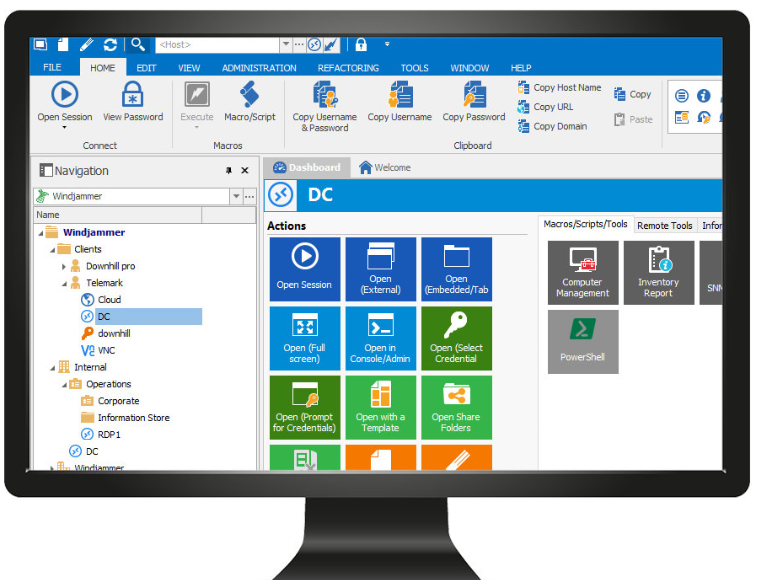
Remote Desktop Manager has the following software features:
1.Remote connection type
Remote Desktop Manager integrates many tools and protocols:Microsoft Remote Desktop、pcAnywhere、TeamViewer、Radmin、VNC、DameWare、HP RGS、Citrix (ICA / HDX)
2.Built-in connection types
Built-in SSH tunnel/shell/FTP Telnet、SSH and SFTP
Integrated Internet Explorer
Local embedded computer remote control
3.VPN connection management
Remote Desktop Manager natively supports multiple VPN types,like:Microsoft VPN,Cisco VPN,SonicWALL VPN和thegreenbow VPN。
as a free plugin,We also offer an extensive range of VPNs,like:OpenVPN,shrewsoft VPN,and many other VPNs compatible with IPSec。These can be downloaded and installed in seconds。
in addition,VPN,SSL and SSH tunnels can be automatically opened upon establishing a remote connection,and configuration can be reused in different sessions,shared with users。
4.Quick connection
Use Quick Connect to quickly access remote machines using Microsoft Remote Desktop,VNC or web page。Just enter a hostname or IP address。
You can even create your own custom templates,Use any other lesson type。
Activation method
- use little snitch or Hands Off! Block access to the following addresses:
cdn.devolutions.net
crm.devolutions.net
Or add the following content to the hosts file (you can use:Gas mask):
127.0.0.1 cdn.devolutions.net
127.0.0.1 crm.devolutions.net - Open SN.txt,Select a set of serial numbers
- Enter
Remote Desktop Manager.app,Select Register - choose
Enterprise Edition,Enter the information above,Just click OK
Most of the download resources on this site are collected from the Internet,Only for learning and communication purposes,Copyright belongs to the original author。If you need to use non-free software or services,Please purchase genuine licenses and use them legally。If the content published on this site infringes upon your rights,Please contact the webmaster to delete,We will handle it promptly。
If the download address is invalid,You can leave me a message,The editor saw the news,Will update the link as soon as possible! Thanks!


