1、Supplementary data description
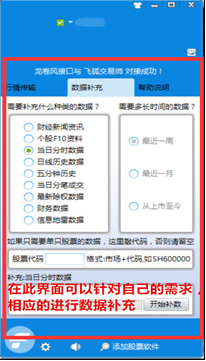
When a user first uses stock software such as Feihu or Analyst to connect to the Tornado market interface,Since there is no historical data in stock software,,For example, historical daily data、5Minute historical data and more,These historical data are very important in users’ stock selection or early warning.。The Tornado market interface provides all historical daily data for all stocks.,Supplement of 5-minute historical data for the latest 168 trading days,We will also continue to provide historical 1-minute and historical tick data in the future.。
2、How to complement
Data to be coded、financial documents、Transfer of ex-rights data completed,After the individual quotations are transmitted, the numbers will be supplemented.。
Notice:Complementing the trading time may delay real-time market conditions,so,It is not recommended to make up numbers during trading hours。
As shown in Figure 1、Figure 2、Figure 3:
Figure 1:
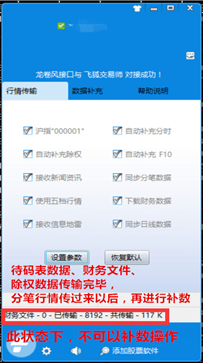
Figure 2:
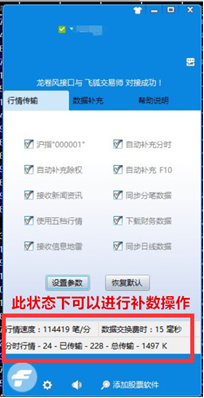
Figure 3:
3、The solution to the problem that data cannot be added during the complement process:
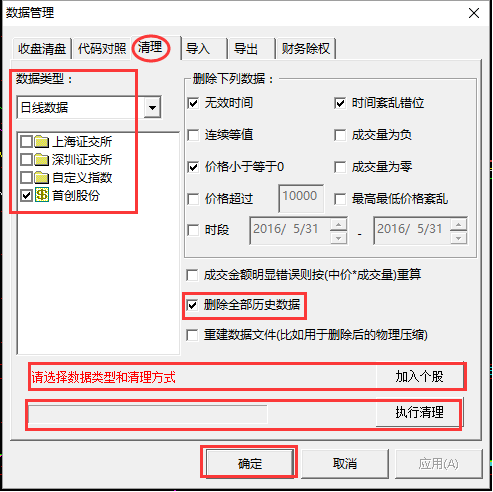
Open Feihu software → "Management" → "Data Management"
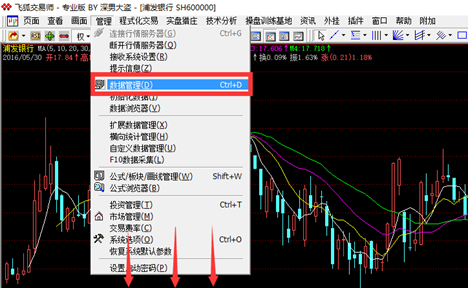
⑴Centralize deletion and then add the number:According to actual situation,Selectively delete all daily data of Shanghai Stock Exchange and Shenzhen Stock Exchange in Feihu Software、5minute data、After dividing the data,Then perform the complement processing operation,The method is as follows:
In "Data Type" → "Clean" → select "Daily Data" according to your actual situation.、5minute data、"Split data" → "Delete all historical data" → "Perform cleaning" → "Confirm" → Follow the complement method again to complete the number.
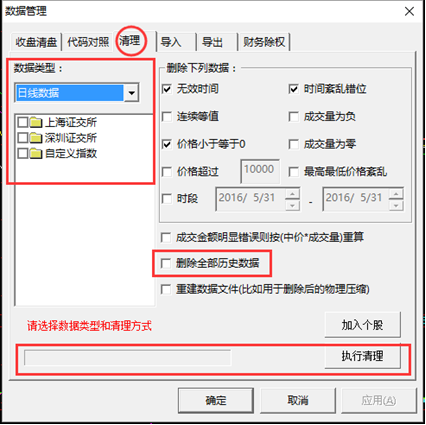
⑵Delete daily data of individual stocks、5minute data、After dividing the data, refill the number again.,The method is as follows:
In "Data Type" → "Clean" → select "Daily Data" according to your actual situation.、5minute data、"Split Data" → "Delete All Historical Data" → "Add Individual Stocks" Select the stock code that needs to be clear → "Perform Cleanup" → "Confirm" → Follow the complement method again to complete the number.