
I often encounter feedback from users who use analysts when receiving market quotes.,Some GEM stocks are not available,Summarized by other users’ solutions and repeatedly verified by users,The following methods have been found to be quite effective:
1、Close and exit your analyst software first。
2、Download the analyst's code table file from the download file location above
3、Copy the decompressed file STKINFO51.DAT to the analyst’s Shenzhen Stock Exchange data directory,Replace files with the same name,As shown below:
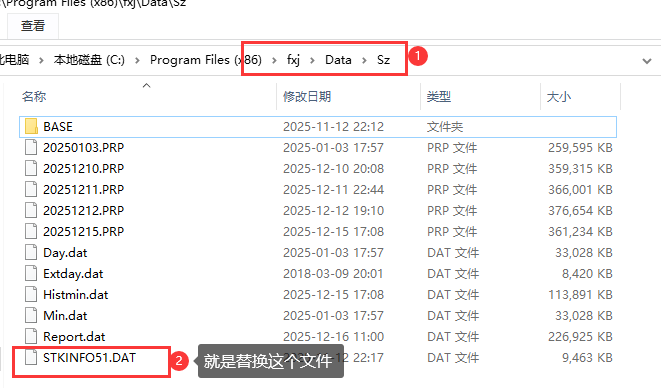
4、Now start the analyst again and take a look,Can you already see the missing GEM stock code?。Any other questions?,Welcome to leave a message in the comment area。We will help you solve it。
statement:All articles on this site,If there is no special instructions or markings,All are originally published by this site。any person or organization,Without the consent of this website,Reproduction prohibited、Misappropriate、collection、Publish content from this site to any website、Books and other media platforms。If the content on this site infringes upon the legitimate rights and interests of the original author,You can contact us for processing。
Can free downloads or VIP membership resources be used directly for commercial use?
The copyright of all resources on this site belongs to the original author,The resources provided here are for reference and study purposes only.,Please do not use it directly for commercial use。If copyright disputes arise due to commercial use,All responsibility lies with the user。For more instructions, please refer to VIP introduction。
It prompts that the download is complete but cannot be decompressed or opened?
The most common situation is an incomplete download: You can compare the capacity of the downloaded compressed package with the capacity on the network disk,If it is less than the capacity prompted by the network disk, this is the reason。This is a browser download bug,It is recommended to download using Baidu Netdisk software or Thunder。 If this situation is excluded,You can leave a message at the bottom of the corresponding resource,or contact us。
Can't find the sample image in the material resource introduction article?
For members only、Whole site source code、Program plug-in、website template、Web page templates and other types of materials,The pictures used for introduction in the article are usually not included in the corresponding downloadable material package.。These related commercial images need to be purchased separately,And this site is not responsible for(There is no way)find source。 The same is true for some font files,However, some materials will have a list of font download links in the material package.。
The download address cannot be displayed or the content cannot be viewed after payment?
If you have successfully paid but the website does not pop up a success prompt,Please contact the webmaster to provide payment information for you to process
After purchasing this resource,Can I get a refund?
Source code materials are virtual goods,replicable,Transmissibility,once granted,No refunds of any kind will be accepted、Exchange request。Please confirm before purchasing to obtain the resources you need.
Comments (1)
Note: Please be respectful and civil in your comments Cancel reply
What to do if PS freezes? Solve the problem easily in a few steps Photoshop (PS) is a powerful image processing software,However, sometimes lag may occur during use.,Even if your computer configuration is not low。generally,This situation is related to the settings of PS。Here are some effective solutions,Help you improve the running speed of PS: 1. Disable the Home screen •Actions:Open PS,Go to Preferences > "conventional",Check "Use the old 'New Document' interface"。 •reason:The home screen of the new version of PS will take up additional resources,Turning it off can lighten the load。 2. Disable less commonly used functions •Operations:Disable less commonly used features under the Tools tab。 •reason:Reducing infrequently used functions can improve the overall running speed of PS。 3. Turn off "Backend Storage" •Operation:Go to Preferences > "File processing",Turn off the "Auto-save recovery information" option。 •reason:Background storage may cause PS to freeze,Especially when working with complex files,Turning it off reduces the burden。 4. Properly set up the scratch disk •Operation:Go to Preferences > "scratch disk",Select SSD as scratch disk,Set up multiple scratch disks (if possible)。 •reason:SSD is faster,Can significantly improve the performance of PS。 5. Adjust graphics processor settings •Action:Go to Preferences > "performance",Choose "Advanced" or "Basic" based on graphics card performance。 •hint:Try turning off the "Use graphics processor" option,See if there is any improvement。 6. Optimize history and cache •Operations:Go to Preferences > "performance",Adjust History and Cache settings。Adjust the cache level (such as 1 or 2) based on the type of image being processed。 •hint:Choose the default settings that suit your type of work (WEB/UI design、Default/Photo、Extra large pixel size)。 7. Optimize layer structure •Operation:Use adjustment layers instead of duplicating layers,Rasterize the smart object after processing is complete。 •reason:Reduce the number of layers and image size,Reduce the operating burden of PS。 8. Adjust text preview settings •Action:Click on the "Text" menu > "Font preview size" > "Small",and in "Preferences" >...
1、Supplementary data description When the user first uses stock software such as Feihu or Analyst to connect to the Tornado market interface,Since there is no historical data in stock software,,For example, historical daily data、5Minute historical data and more,These historical data are very important in users’ stock selection or early warning.。The Tornado market interface provides all historical daily data for all stocks.,Supplement of 5-minute historical data for the latest 168 trading days,We will also continue to provide historical 1-minute and historical tick data in the future.。 2、How to complement the data to be coded、financial documents、Transfer of ex-rights data completed,After the individual quotations are transmitted, the numbers will be supplemented.。 Notice:Complementing the trading time may delay real-time market conditions,so,It is not recommended to make up numbers during trading hours。 As shown in Figure 1、Figure 2、Figure 3: Figure 1: Figure 2: Figure 3: 3、The solution to the problem that data cannot be added during the complement process: Open Feihu software → "Management" → "Data Management" ⑴ Replenish the number after centralized deletion:According to actual situation,Selectively delete all daily data of Shanghai Stock Exchange and Shenzhen Stock Exchange in Feihu Software、5minute data、After dividing the data,Then perform the complement processing operation,The method is as follows: In "Data Type" → "Clean" → select "Daily Data" according to your actual situation.、5minute data、"Split data" → "Delete all historical data" → "Execute cleanup" → "Confirm" → Follow the complement method again to complete the number ⑵ Delete the daily data of individual stocks、5minute data、After dividing the data, refill the number again.,The method is as follows: In "Data Type" → "Clean" → select "Daily Data" according to your actual situation.、5minute data、"Split Data" → "Delete All Historical Data" → "Add Individual Stocks" Select the stock code that needs to be clear → "Perform Cleanup" → "Confirm" → Follow the complement method again to complete the number.
Comparison table of the new and old codes of the North Exchange that changed the original codes starting with 4 and 8 to codes starting with 9: Serial number Securities abbreviation Listing date Old code New code 1 Wuxi Dingbang 2024/4/8 872931 920931 2 Bawei shares 2024/3/29 837023 920123 3 Gobija 2024/3/25 835438 920438 4 Tietuo Machinery 2024/3/8 873706 920706 5 Haisheng Pharmaceutical 2024/2/2 870656 920656 6 Xuchang Intelligent 2024/1/26 831396 920496 7 Kangnong Seed Industry 2024/1/18 837403...
Attached is the 8th week of 2026,That is, the historical 1-minute data of Shanghai and Shenzhen stocks for a total of 5 trading days from 2026-03-02 to 2026-03-06。After downloading the file, please use winrar to decompress it first.,The file directory contains the data files for each stock.,Formatted as TXT text,You can open it directly to view。 If you are using FeiFox,The data import method is as shown below: If you also need historical 1-minute data in other formats,Please leave a message in the comment area。Currently, only historical 1-minute data in TXT format is provided.。
Download all historical daily data of Shanghai and Shenzhen stocks(A total of four data packets are divided into time periods) This data is generally normal every morning at 10:00Previous update,If there is any update that is not timely,Please leave a reminder in the comment area。 The download button 1 at the top shows the historical daily data of Shanghai and Shenzhen stocks in 2026.(From 2026-01-01 to the latest date 2026-03-20)。After downloading the file, please use winrar to decompress it first.,The file is Feihu system QDA daily data format,You can directly import it into Feihu’s data management.。This data package is updated from time to time within 8 hours after the market closes on each trading day.。 The download button 2 at the top shows the historical daily data of Shanghai and Shenzhen stocks from 2020 to 2025.(From 2020-01-01 to 2025-12-31)。After downloading the file, please use winrar to decompress it first.,The file is Feihu system QDA daily data format,You can directly import it into Feihu’s data management.。This data package is historical archive data。 Download button 3 at the top shows the historical daily data of Shanghai and Shenzhen stocks from 2010 to 2019.(From 2010-01-01 to 2019-12-31)。After downloading the file, please use winrar to decompress it first.,The file is Feihu system QDA daily data format,You can directly import it into Feihu’s data management.。This data package is historical archive data。 The download button 4 at the top shows the historical daily data of Shanghai and Shenzhen stocks before December 31, 2009.。After downloading the file, please use winrar to decompress it first.,The file is Feihu system QDA daily data format,You can directly import it into Feihu’s data management.。This data package is historical archive data。
Attached is the second week of 2026,That is, the historical 1-minute data of Shanghai and Shenzhen stocks for a total of 5 trading days from 2026-01-12 to 2026-01-16。After downloading the file, please use winrar to decompress it first.,The file directory contains the data files for each stock.,Formatted as TXT text,You can open it directly to view。 If you are using FeiFox,The data import method is as shown below: If you also need historical 1-minute data in other formats,Please leave a message in the comment area。Currently, only historical 1-minute data in TXT format is provided.。
Attached is the historical transaction data of Shanghai and Shenzhen stocks on March 18, 2026。After downloading the file, please use winrar to decompress it first.,The compressed file contains three file directories,They are Shanghai Stock Exchange、Shenzhen City、Beijing City's transaction data files on March 18, 2026(A total of three QRT files),The format is QRT used by Feihu。Contains three levels of buying and selling orders,As shown below: Copy the three file directories obtained after decompression above directly to the DATA folder of the Feifox installation directory.,As shown below: If you also need historical data in other formats,Please leave a message in the comment area。Currently, only historical transaction data in Feihu format is provided.。
Tornado data interface installation package download supports Feihu trader interface installation package(Regular version) latest version:5.6.5.1 Update date:2021-12-15 size:6.8MB This interface installation package can support various versions of Feihu Trader 5.0 series,such as Network Professional、Flying Fox Dark Blue Avenue Edition、Online version、Ideal version、Legendary Heroine Edition, etc.,But it currently does not support 5.1 Big Trader、2.1KT Trader and some other Flying Fox-like versions,Please note that users。Please download the interface installation package from the download button at the top of the page。 Support analyst interface installation package(Regular version) latest version:5.6.5.1 Update date:2021-12-15 size:6.8M can support various versions of analysts,Versions such as 5.0 and 2006,5.0When using,Install the interface directly,Open the analyst and you can use it,2006When using,You need to first copy the StockDrv.dll file in the interface installation directory to the analyst installation directory.,Then open the analyst and you can use it。Please download the interface installation package from the download button at the top of the page。 Support programming to obtain market quotation installation package(Development version) latest version:6.6.3.7 Update date:2021-05-31 size:6.5M installation method:After downloading, open the installer,It can be installed anywhere on the machine. The development version installation interface is for programming development users to obtain market data through API.。VB is currently provided after paid purchase、VC、DELPHI、C#、Call DEMO in any of five languages including PYTHON,Please be sure to consult Want Want customer service before purchasing。Please download the interface installation package from the download button at the top of the page。 FeiFox Trader installation package download FeiFox Network Professional Edition installation package FeiFox Trader software can process all push real-time market prices in real time,Used for real-time warning and stock selection,Has relatively strong stock selection capabilities and real-time warning capabilities,It is a powerful tool for technical analysis by investors who focus on technical analysis.,This installation package is a safe installation package that we collected from the Internet and has been verified by anti-virus.,Users can download with confidence,Some security software such as 360 may falsely report,Please add Feihu’s installation directory to 360’s whitelist after installation.。You can download the Feihu Network Professional Edition installation package from the download button at the top of the page.。 Feihu online version installation package Feihu trader software can process all real-time market prices in real time,Used for real-time warning and stock selection,Has relatively strong stock selection capabilities and real-time warning capabilities,It is a powerful tool for technical analysis by investors who focus on technical analysis.,This installation package is a safe installation package that we collected from the Internet and has been verified by anti-virus.,Users can download with confidence,Some security software such as 360 may falsely report,Please add Feihu’s installation directory to 360’s whitelist after installation.。You can download the Feihu Online version installation package from the download button at the top of the page.。 Feihu ideal Qianjun version installation package Feihu trader software can process all real-time market prices in real time,Used for real-time warning and stock selection,Has relatively strong stock selection capabilities and real-time warning capabilities,It is a powerful tool for technical analysis by investors who focus on technical analysis.,This installation package is a safe installation package that we collected from the Internet and has been verified by anti-virus.,Users can download with confidence,Some security software such as 360 may falsely report,Please add Feihu’s installation directory to 360’s whitelist after installation.。You can download the Feihu Ideal Qianjun Edition installation package from the download button at the top of the page.。 Feihu Legend Female Version Installation Package Feihu Trader Software can process all real-time market prices in real time,Used for real-time warning and stock selection,Has relatively strong stock selection capabilities and real-time warning capabilities,It is a powerful tool for technical analysis by investors who focus on technical analysis.,This installation package is a safe installation package that we collected from the Internet and has been verified by anti-virus.,Users can download with confidence,Some security software such as 360 may falsely report,Please add Feihu’s installation directory to 360’s whitelist after installation.。You can download the installation package of Flying Fox Legend Female Hero Edition from the download button at the top of the page.。 Analyst software installation package download Analyst 2006(6.0)Version installation package Analyst software can process all real-time market trends in real time,Used for real-time warning and stock selection,Has relatively strong stock selection capabilities and real-time warning capabilities,It is a powerful tool for technical analysis by investors who focus on technical analysis.,This installation package is a safe installation package that we collected from the Internet and has been verified by anti-virus.,Users can download with confidence,Of course, users can also go to the analyst’s official website to download,Some security software such as 360 may falsely report,Please add the analyst’s installation directory to 360’s whitelist after installation.。You can download the Analyst 2006 version installation package from the download button at the top of the page.。 Analyst version 5.0 installation package Analyst software can process all real-time market prices in real time,Used for real-time warning and stock selection,Has relatively strong stock selection capabilities and real-time warning capabilities,It is a powerful tool for technical analysis by investors who focus on technical analysis.,This installation package is a safe installation package that we collected from the Internet and has been verified by anti-virus.,Users can download with confidence,Of course, users can also go to the analyst’s official website to download,Some security software such as 360 may falsely report,Please add the analyst’s installation directory to 360’s whitelist after installation.。You can download the Analyst version 5.0 installation package from the download button at the top of the page。 Analyst 5.0.1.0023 institutional version installation package Analyst software can process all real-time market prices in real time,Used for real-time warning and stock selection,Has relatively strong stock selection capabilities and real-time warning capabilities,It is a powerful tool for technical analysis by investors who focus on technical analysis.,This installation package is a safe installation package that we collected from the Internet and has been verified by anti-virus.,Users can download with confidence,Of course, users can also go to the analyst’s official website to download,Some security software such as 360 may falsely report,Please add the analyst’s installation directory to 360’s whitelist after installation.。You can download the Analyst 5.0.1.0023 institutional version installation package from the download button at the top of the page.。
Attached is the second week of 2026,That is, the historical 5-minute data of Shanghai and Shenzhen stocks for a total of 5 trading days from 2026-01-12 to 2026-01-16。After downloading the file, please use winrar to decompress it first.,The file directory contains the data files for each stock.,Formatted as TXT text,You can open it directly to view。 If you are using FeiFox,The data import method is as shown below: If you also need historical 5-minute data in other formats,Please leave a message in the comment area。Currently, only historical 5-minute data in TXT format is provided.。
Possible reasons why external disks are not displayed: 1.connection problem: •Make sure the cables are connected correctly。The USB or HDMI connection should be plugged securely into your Mac and external drive ports。 •Try changing to a different cable,To rule out the possibility of cable failure。 2.Port problem: •If you have multiple USB ports,Try connecting the external drive to another port,Check if it is displayed on the desktop。There may be a hardware problem with the currently connected port.。 3.System problem: •Restart your Mac,to clear possible temporary data corruption。Select Apple menu > Restart or hold the power button,Then press R key to restart。 •Reset NVRAM (Non-Volatile Random Access Memory Parameter Memory),The method is to shut down your Mac,Reopen and immediately hold down Option、Command、P and R keys for at least 20 seconds,Until you hear the second startup sound。 4. drive format: • Make sure the external drive is formatted to a Mac-compatible format,Such as ExFAT or Mac OS extended format。Some Windows formats (such as NTFS) may require additional drivers to be installed to work properly on Mac。 5. Show on desktop: •If the external drive is recognized but not displayed on the desktop,Please go to the Finder menu > Preferences (Cmd + comma),Check "External Disk" in the "General" tab,Make sure it shows up on the desktop。 6. Use disk utility: •Open Disk Utility (located under Applications > in "Utilities"),Check to see if the external drive is shown。You can try to mount it,Make it visible in Finder and desktop。 How to show connected devices in Finder: •Go to Finder menu,Then select Preferences (Cmd + comma)。 •In the "General" tab,Make sure "External Disk" is checked,This way they will appear on the desktop。 How to add cloud storage to Finder: •You can install applications such as CloudMounter,so that Google Drive、Dropbox or Amazon cloud drive added to Finder as local drive,To more conveniently access and manage cloud storage files。 go through these steps,You should be able to resolve most external disk not showing up issues on Mac,and make sure they work properly。If you have any other questions or need further help,Please keep us informed!
Attached is the 53rd week of 2025,That is, the historical 1-minute data of Shanghai and Shenzhen stocks for a total of 3 trading days from 2025-12-29 to 2025-12-31。After downloading the file, please use winrar to decompress it first.,The file directory contains the data files for each stock.,Formatted as TXT text,You can open it directly to view。 If you are using FeiFox,The data import method is as shown below: If you also need historical 1-minute data in other formats,Please leave a message in the comment area。Currently, only historical 1-minute data in TXT format is provided.。
Attached is the 51st week of 2025,That is, the historical 5-minute data of Shanghai and Shenzhen stocks for 5 trading days from 2025-12-15 to 2025-12-19。After downloading the file, please use winrar to decompress it first.,The file directory contains the data files for each stock.,Formatted as TXT text,You can open it directly to view。 If you are using FeiFox,The data import method is as shown below: If you also need historical 5-minute data in other formats,Please leave a message in the comment area。Currently, only historical 5-minute data in TXT format is provided.。
Comments (1)

