

Download and use of Feihu and Analyst section files:
How to use Feihu section files:
1、Unzip the downloaded StkBlock.rar,Then copy the decompressed folder StkBlock to Feihu’s installation directory.,Just overwrite the folder with the same name。As shown below:
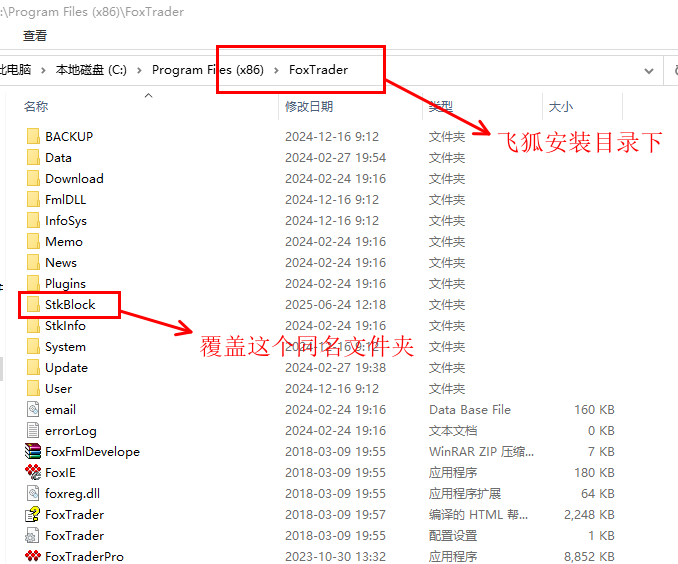
Notice:It is recommended to back up Feihu’s selected stocks and other data before use.。
2、Feihu section file update time:2026September 7, year
3、Feihu section file download address:See the download address button on the page。
How to use analyst section files:
1、Unzip the downloaded block.rar,Then copy the decompressed folder block to the analyst’s installation directory.,Just overwrite the folder with the same name。As shown below:
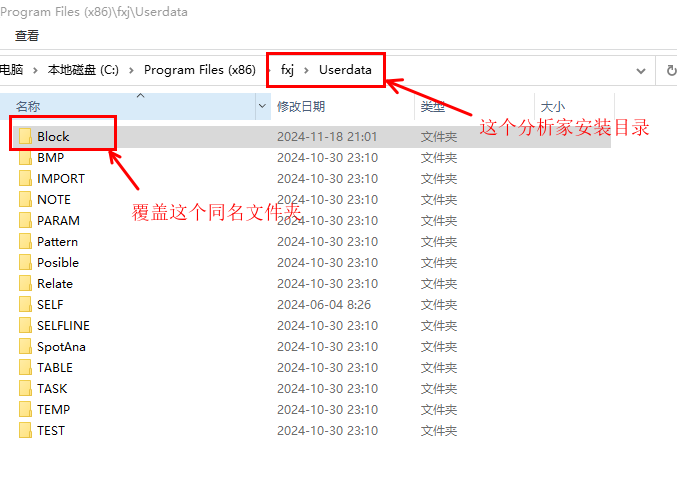
Notice:It is recommended to back up the analyst's stock selection data before use.。
2、Analyst section file update time:2026September 7, year
3、Analyst section file download address:See the download address button on the page。
Most of the download resources on this site are collected from the Internet,Only for learning and communication purposes,Copyright belongs to the original author。If you need to use non-free software or services,Please purchase genuine licenses and use them legally。If the content published on this site infringes upon your rights,Please contact the webmaster to delete,We will handle it promptly。
If the download address is invalid,You can leave me a message,The editor saw the news,Will update the link as soon as possible! Thanks!



1F
请及时更新板块文件,这才是飞狐目前最缺的,尽整些1、5minute data。
B1
@ 兰雪儿 板块文件已经更新了。