
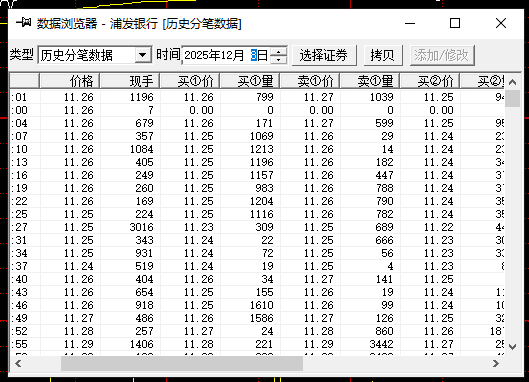
Attached is the historical data of Shanghai and Shenzhen stocks on 2026-03-17。After downloading the file, please use winrar to decompress it first.,The compressed file contains three file directories,They are Shanghai Stock Exchange、Shenzhen City、Beijing City’s transaction data files on 2026-03-17(A total of three QRT files),The format is QRT used by Feihu。Contains three levels of buying and selling orders,As shown below:
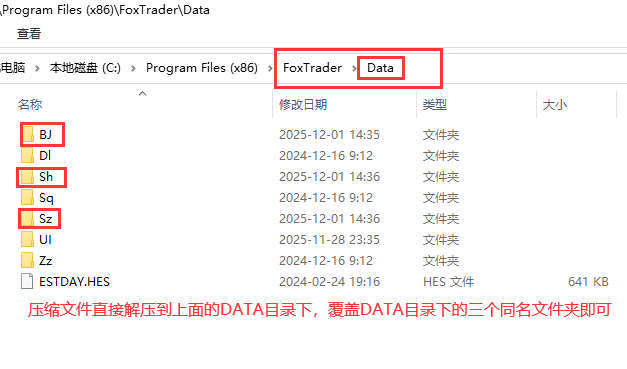
Copy the three file directories obtained after decompression above directly to the DATA folder of the Feifox installation directory.,As shown below:
If you also need historical data in other formats,Please leave a message in the comment area。Currently, only historical transaction data in Feihu format is provided.。
statement:All articles on this site,If there is no special instructions or markings,All are originally published by this site。any person or organization,Without the consent of this website,Reproduction prohibited、Misappropriate、collection、Publish content from this site to any website、Books and other media platforms。If the content on this site infringes upon the legitimate rights and interests of the original author,You can contact us for processing。
Can free downloads or VIP membership resources be used directly for commercial use?
The copyright of all resources on this site belongs to the original author,The resources provided here are for reference and study purposes only.,Please do not use it directly for commercial use。If copyright disputes arise due to commercial use,All responsibility lies with the user。For more instructions, please refer to VIP introduction。
It prompts that the download is complete but cannot be decompressed or opened?
The most common situation is an incomplete download: You can compare the capacity of the downloaded compressed package with the capacity on the network disk,If it is less than the capacity prompted by the network disk, this is the reason。This is a browser download bug,It is recommended to download using Baidu Netdisk software or Thunder。 If this situation is excluded,You can leave a message at the bottom of the corresponding resource,or contact us。
Can't find the sample image in the material resource introduction article?
For members only、Whole site source code、Program plug-in、website template、Web page templates and other types of materials,The pictures used for introduction in the article are usually not included in the corresponding downloadable material package.。These related commercial images need to be purchased separately,And this site is not responsible for(There is no way)find source。 The same is true for some font files,However, some materials will have a list of font download links in the material package.。
The download address cannot be displayed or the content cannot be viewed after payment?
If you have successfully paid but the website does not pop up a success prompt,Please contact the webmaster to provide payment information for you to process
After purchasing this resource,Can I get a refund?
Source code materials are virtual goods,replicable,Transmissibility,once granted,No refunds of any kind will be accepted、Exchange request。Please confirm before purchasing to obtain the resources you need.
Comments (0)
Note: Please be respectful and civil in your comments Cancel reply
Attached is the 51st week of 2025,That is, the historical 1-minute data of Shanghai and Shenzhen stocks for a total of 5 trading days from 2025-12-15 to 2025-12-19。After downloading the file, please use winrar to decompress it first.,The file directory contains the data files for each stock.,Formatted as TXT text,You can open it directly to view。 If you are using FeiFox,The data import method is as shown below: If you also need historical 1-minute data in other formats,Please leave a message in the comment area。Currently, only historical 1-minute data in TXT format is provided.。
This data is generally normal every morning at 10:00Previous update,If there is any update that is not timely,Please leave a reminder in the comment area。 Attached is the 10th week of 2026,That is, the historical 1-minute data of Shanghai and Shenzhen stocks for a total of 5 trading days from 2026-03-16 to 2026-03-20。After downloading the file, please use winrar to decompress it first.,The file directory contains the data files for each stock.,Formatted as TXT text,You can open it directly to view。 If you are using FeiFox,The data import method is as shown below: If you also need historical 1-minute data in other formats,Please leave a message in the comment area。Currently, only historical 1-minute data in TXT format is provided.。
Attached is the 52nd week of 2025,That is, the historical 1-minute data of Shanghai and Shenzhen stocks for a total of 5 trading days from 2025-12-22 to 2025-12-26。After downloading the file, please use winrar to decompress it first.,The file directory contains the data files for each stock.,Formatted as TXT text,You can open it directly to view。 If you are using FeiFox,The data import method is as shown below: If you also need historical 1-minute data in other formats,Please leave a message in the comment area。Currently, only historical 1-minute data in TXT format is provided.。
1、ask:Can Tornado support multiple machines? answer:cannot be used at the same time,An account can only run on one machine at a time,When using multiple machines at the same time,Multiple corresponding accounts are required; 2、ask:Which version of the Feihu stock software you provide is better? answer:Our website also collects and organizes online,Almost the same,They are all different names given by netizens after they cracked the genuine Feihu.,Relatively speaking, more people use the online professional version.; 3、ask:Where can I see the expiration date in the software? 4、ask:Can automatically open tornado,But could not successfully dock with Feihu,How to solve it? answer:If you can't connect,Check as follows,1:Check under the Management menu,Have you switched data sources?,if there is,Select View,then confirm。2:Start Feihu as administrator,Then just connect。 5、ask:Tornado interface and Feihu successfully connected,But can't receive data? answer:Feihu needs initialization processing,otherwise,data transfer in,Flying Fox does not charge; 6、Explanation and solutions to the statement about the false alarm of Tornado stock interface software Trojan virus by 360 and other anti-virus software: statement:As a professional fee-based software that provides full push data for technical stock investors,We will never implant any Trojan viruses in our software。Users can go to http://www.virscan.org/ website for testing,This website is a non-profit testing website,It contains tests for dozens of authoritative anti-virus software at home and abroad.。 Solution:The Tornado interface software needs to be added to the whitelist of 360 and other series software.,Otherwise, 360 and other series software may cause false positives or delete the corresponding files in the interface.,Disable the interface from functioning properly,For specific operations, please refer to the following URL link: http://jingyan.baidu.com/article/f71d60377821641ab641d19f.html
Individual users who use China Unicom Broadband occasionally report that the market reception is slow.,Large delay,It causes great inconvenience to using Feihu or analysts for stock selection and early warning.,Here we provide effective solutions that users have fed back to us for your reference.: 1、After logging into the tornado market interface interface,Click the "Please select a broadband provider" button on the interface,As shown below: 2、Select China Unicom in the window that appears as shown below.。As shown below: 3、Click the gear-like button in the lower left corner of the interface interface,As shown in the picture: 4、Then follow the icon below,This must be done for every non-China Unicom server record。 5、at last,See if your interface is the same as the one below,Only China Unicom’s servers are designated,The servers of China Telecom and China Mobile are in an unspecified state.。As shown below: Now you can restart Feihu or the analyst and interface software,See if the market reception is completely normal?。
Attached is the 7th week of 2026,That is, the historical 5-minute data of Shanghai and Shenzhen stocks for a total of 4 trading days from 2026-02-24 to 2026-02-27。After downloading the file, please use winrar to decompress it first.,The file directory contains the data files for each stock.,Formatted as TXT text,You can open it directly to view。 If you are using FeiFox,The data import method is as shown below: If you also need historical 5-minute data in other formats,Please leave a message in the comment area。Currently, only historical 5-minute data in TXT format is provided.。
Attached is the historical transaction data of Shanghai and Shenzhen stocks on 2026-03-16。After downloading the file, please use winrar to decompress it first.,The compressed file contains three file directories,They are Shanghai Stock Exchange、Shenzhen City、Beijing City’s transaction data files on March 16, 2026(A total of three QRT files),The format is QRT used by Feihu。Contains three levels of buying and selling orders,As shown below: Copy the three file directories obtained after decompression above directly to the DATA folder of the Feifox installation directory.,As shown below: If you also need historical data in other formats,Please leave a message in the comment area。Currently, only historical transaction data in Feihu format is provided.。
Attached is the 9th week of 2026,That is, the historical 1-minute data of Shanghai and Shenzhen stocks for a total of 5 trading days from 2026-03-09 to 2026-03-13。After downloading the file, please use winrar to decompress it first.,The file directory contains the data files for each stock.,Formatted as TXT text,You can open it directly to view。 If you are using FeiFox,The data import method is as shown below: If you also need historical 1-minute data in other formats,Please leave a message in the comment area。Currently, only historical 1-minute data in TXT format is provided.。
Attached is the 53rd week of 2025,That is, the historical 1-minute data of Shanghai and Shenzhen stocks for a total of 3 trading days from 2025-12-29 to 2025-12-31。After downloading the file, please use winrar to decompress it first.,The file directory contains the data files for each stock.,Formatted as TXT text,You can open it directly to view。 If you are using FeiFox,The data import method is as shown below: If you also need historical 1-minute data in other formats,Please leave a message in the comment area。Currently, only historical 1-minute data in TXT format is provided.。
Attached is the 4th week of 2026,That is, the historical 1-minute data of Shanghai and Shenzhen stocks for a total of 5 trading days from 2026-01-26 to 2026-01-30。After downloading the file, please use winrar to decompress it first.,The file directory contains the data files for each stock.,Formatted as TXT text,You can open it directly to view。 If you are using FeiFox,The data import method is as shown below: If you also need historical 1-minute data in other formats,Please leave a message in the comment area。Currently, only historical 1-minute data in TXT format is provided.。
Because the code of the Shanghai Composite Index in the early days was in the format of 1A0001,At present, there are still a very small number of users who use Feihu and are still accustomed to using the Shanghai Composite Index in the 1A0001 format.,However, the standard code of the Shanghai Composite Index in the data transmitted by the Tornado Market Interface is 000001,In this way, users will not be able to see the Shanghai Composite Index in Feihu stock software.。 Because the Tornado interface transmits the Shanghai Composite Index of 000001 by default,So if the 1A0001 user used before cannot receive data,Treatment method:Uncheck,Save settings,Restart the interface to take effect。As shown below:
Attached is the first week of 2026,That is, the historical 5-minute data of Shanghai and Shenzhen stocks for 5 trading days from 2026-01-05 to 2026-01-09。After downloading the file, please use winrar to decompress it first.,The file directory contains the data files for each stock.,Formatted as TXT text,You can open it directly to view。 If you are using FeiFox,The data import method is as shown below: If you also need historical 5-minute data in other formats,Please leave a message in the comment area。Currently, only historical 5-minute data in TXT format is provided.。
Comments (0)

