
Attached is the 50th week of 2025,That is, the historical 1-minute data of Shanghai and Shenzhen stocks for a total of 5 trading days from 2025-12-08 to 2025-12-12。After downloading the file, please use winrar to decompress it first.,The file directory contains the data files for each stock.,Formatted as TXT text,You can open it directly to view。
If you are using FeiFox,The data import method is as shown below:
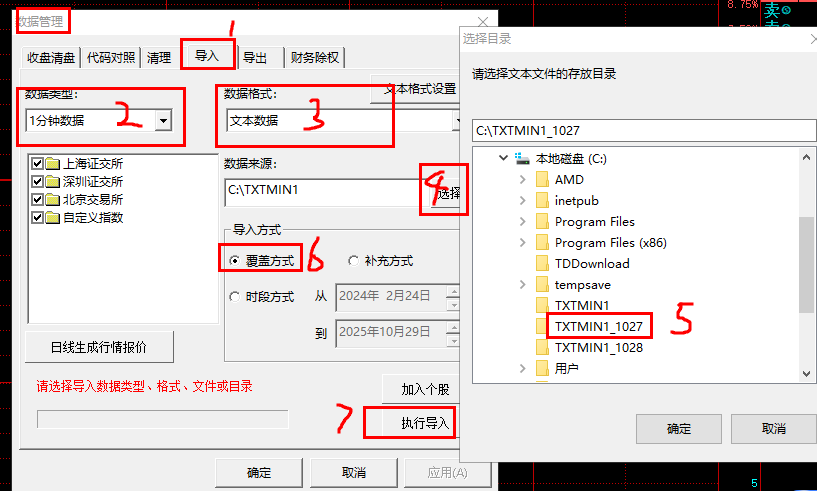
If you also need historical 1-minute data in other formats,Please leave a message in the comment area。Currently, only historical 1-minute data in TXT format is provided.。
statement:All articles on this site,If there is no special instructions or markings,All are originally published by this site。any person or organization,Without the consent of this website,Reproduction prohibited、Misappropriate、collection、Publish content from this site to any website、Books and other media platforms。If the content on this site infringes upon the legitimate rights and interests of the original author,You can contact us for processing。
Can free downloads or VIP membership resources be used directly for commercial use?
The copyright of all resources on this site belongs to the original author,The resources provided here are for reference and study purposes only.,Please do not use it directly for commercial use。If copyright disputes arise due to commercial use,All responsibility lies with the user。For more instructions, please refer to VIP introduction。
It prompts that the download is complete but cannot be decompressed or opened?
The most common situation is an incomplete download: You can compare the capacity of the downloaded compressed package with the capacity on the network disk,If it is less than the capacity prompted by the network disk, this is the reason。This is a browser download bug,It is recommended to download using Baidu Netdisk software or Thunder。 If this situation is excluded,You can leave a message at the bottom of the corresponding resource,or contact us。
Can't find the sample image in the material resource introduction article?
For members only、Whole site source code、Program plug-in、website template、Web page templates and other types of materials,The pictures used for introduction in the article are usually not included in the corresponding downloadable material package.。These related commercial images need to be purchased separately,And this site is not responsible for(There is no way)find source。 The same is true for some font files,However, some materials will have a list of font download links in the material package.。
The download address cannot be displayed or the content cannot be viewed after payment?
If you have successfully paid but the website does not pop up a success prompt,Please contact the webmaster to provide payment information for you to process
After purchasing this resource,Can I get a refund?
Source code materials are virtual goods,replicable,Transmissibility,once granted,No refunds of any kind will be accepted、Exchange request。Please confirm before purchasing to obtain the resources you need.
Comments (0)
Note: Please be respectful and civil in your comments Cancel reply
Recently, some users using mobile broadband have reported that market reception is slow.,Large delay,It causes great inconvenience to using Feihu or analysts for stock selection and early warning.,Here we provide effective solutions that users have fed back to us for your reference.: 1、After logging into the tornado market interface interface,Click the "Please select a broadband provider" button on the interface,As shown below: 2、Select China Mobile in the window that appears as shown below.,Others use Great Wall Broadband、Founder Broadband and others also recommend choosing the China Mobile option。As shown below: 3、Click the gear-like button in the lower left corner of the interface interface,As shown in the picture: 4、Then follow the icon below,Do this for every non-mobile server record。 5、at last,See if your interface is the same as the one below,Only mobile servers are specified,The servers of China Telecom and China Unicom are both in unspecified status.。As shown below: Now you can restart Feihu or the analyst and interface software,See if the market reception is completely normal?。
Attached is the 51st week of 2025,That is, the historical 1-minute data of Shanghai and Shenzhen stocks for a total of 5 trading days from 2025-12-15 to 2025-12-19。After downloading the file, please use winrar to decompress it first.,The file directory contains the data files for each stock.,Formatted as TXT text,You can open it directly to view。 If you are using FeiFox,The data import method is as shown below: If you also need historical 1-minute data in other formats,Please leave a message in the comment area。Currently, only historical 1-minute data in TXT format is provided.。
Attached is the 52nd week of 2025,That is, the historical 5-minute data of Shanghai and Shenzhen stocks for 5 trading days from 2025-12-22 to 2025-12-26。After downloading the file, please use winrar to decompress it first.,The file directory contains the data files for each stock.,Formatted as TXT text,You can open it directly to view。 If you are using FeiFox,The data import method is as shown below: If you also need historical 5-minute data in other formats,Please leave a message in the comment area。Currently, only historical 5-minute data in TXT format is provided.。
Attached is the 52nd week of 2025,That is, the historical 1-minute data of Shanghai and Shenzhen stocks for a total of 5 trading days from 2025-12-22 to 2025-12-26。After downloading the file, please use winrar to decompress it first.,The file directory contains the data files for each stock.,Formatted as TXT text,You can open it directly to view。 If you are using FeiFox,The data import method is as shown below: If you also need historical 1-minute data in other formats,Please leave a message in the comment area。Currently, only historical 1-minute data in TXT format is provided.。
Attached is the fifth week of 2026,That is, the historical 1-minute data of Shanghai and Shenzhen stocks for a total of 5 trading days from 2026-02-02 to 2026-02-06。After downloading the file, please use winrar to decompress it first.,The file directory contains the data files for each stock.,Formatted as TXT text,You can open it directly to view。 If you are using FeiFox,The data import method is as shown below: If you also need historical 1-minute data in other formats,Please leave a message in the comment area。Currently, only historical 1-minute data in TXT format is provided.。
Individual users who use China Unicom Broadband occasionally report that the market reception is slow.,Large delay,It causes great inconvenience to using Feihu or analysts for stock selection and early warning.,Here we provide effective solutions that users have fed back to us for your reference.: 1、After logging into the tornado market interface interface,Click the "Please select a broadband provider" button on the interface,As shown below: 2、Select China Unicom in the window that appears as shown below.。As shown below: 3、Click the gear-like button in the lower left corner of the interface interface,As shown in the picture: 4、Then follow the icon below,This must be done for every non-China Unicom server record。 5、at last,See if your interface is the same as the one below,Only China Unicom’s servers are designated,The servers of China Telecom and China Mobile are in an unspecified state.。As shown below: Now you can restart Feihu or the analyst and interface software,See if the market reception is completely normal?。
Full stock software: so-called full push,That is, all securities data are sent simultaneously,No matter whether you watch the market or not,Data is synchronized,You won’t feel stagnant when watching it,At the same time, some operations can be performed in real time,For example, intraday stock picking or real-time warnings。 On-demand stock software: The current page’s stock and Shanghai Composite Index quotes are updated the fastest,Among them, the Shanghai Composite Index is updated unconditionally (functional design),The second is the quotation list or optional stock page quotations.,30-50 stocks depending on screen size,The stocks visible on this page are updated automatically.,Other stocks will not be updated.,Great Wisdom’s new generation of on-demand updates (only current stocks can be updated in real time)。 Comparing advantages and disadvantages: Advantages of full market promotion: receive in real time,No lag is felt when switching stocks,At the same time, it can realize the functions of intraday stock selection and real-time warning.,For the new generation of investors,There are often requirements for full market quotation。 Disadvantages of full market push: Data transmission takes up a lot of network resources,And if there is a problem with the network,prone to incomplete data,Larger results will occur,At the same time, real-time stock selection and early warning indicators take up a lot of resources.,If the software does not handle it well,There will be lag,Even stuck and suspended animation。 Advantages of on-demand quotes: Occupies less network resources,At the same time, it is beneficial to the stability of the server.。 Disadvantages of on-demand quotes: Unable to pick stocks in real time,When each stock is opened,Downloading existing data will be delayed。 Comparison of transmission speed and data transmission volume between full-stock stock software and on-demand stock software: Transmission speed:The speed of full push stock software is slightly slower than that of on-demand software by about 5 seconds (the specific situation depends on the network environment). Transmission data amount:The amount of data transmitted by the fully recommended stock software is thousands of times larger than that of the on-demand stock software. The fully recommended stock software represents:flying fox、Analysts and other classic on-demand stock representative software:Tong Da Xin、Flush、Oriental Fortune、The Great Wisdom Tornado market interface can provide L1 five-level full-market market for Feihu 5.07 series and Analyst 6.0 version.。
Download and use of Feihu and Analyst section files: How to use Feihu section files: 1、Unzip the downloaded StkBlock.rar,Then copy the decompressed folder StkBlock to Feihu’s installation directory.,Just overwrite the folder with the same name。As shown below: Notice:It is recommended to back up Feihu’s selected stocks and other data before use.。 2、Feihu section file update time:2026March 12, year 3、Feihu section file download address:See downloads at the top of the page and in the upper right sidebar。 How to use analyst section files: 1、Unzip the downloaded block.rar,Then copy the decompressed folder block to the analyst’s installation directory.,Just overwrite the folder with the same name。As shown below: Notice:It is recommended to back up the analyst's stock selection data before use.。 2、Analyst section file update time:2026March 12, year 3、Analyst section file download address:See downloads at the top of the page and in the upper right sidebar。
Attached is the first week of 2026,That is, the historical 5-minute data of Shanghai and Shenzhen stocks for 5 trading days from 2026-01-05 to 2026-01-09。After downloading the file, please use winrar to decompress it first.,The file directory contains the data files for each stock.,Formatted as TXT text,You can open it directly to view。 If you are using FeiFox,The data import method is as shown below: If you also need historical 5-minute data in other formats,Please leave a message in the comment area。Currently, only historical 5-minute data in TXT format is provided.。
Attached is the historical transaction data of Shanghai and Shenzhen stocks on 2026-03-16。After downloading the file, please use winrar to decompress it first.,The compressed file contains three file directories,They are Shanghai Stock Exchange、Shenzhen City、Beijing City’s transaction data files on March 16, 2026(A total of three QRT files),The format is QRT used by Feihu。Contains three levels of buying and selling orders,As shown below: Copy the three file directories obtained after decompression above directly to the DATA folder of the Feifox installation directory.,As shown below: If you also need historical data in other formats,Please leave a message in the comment area。Currently, only historical transaction data in Feihu format is provided.。
I often encounter feedback from users who use analysts when receiving market quotes.,Some stocks on the Science and Technology Innovation Board do not have,Summarized by other users’ solutions and repeatedly verified by users,The following methods have been found to be quite effective: 1、Close and exit your analyst software first。 2、Download the analyst’s SSE code table file from the download file location above 3、Copy the decompressed file STKINFO51.DAT to the analyst’s Shanghai Stock Exchange data directory,Replace files with the same name,As shown below: 4、Now start the analyst again and take a look,Can you already see the missing stock code of the Science and Technology Innovation Board?。Any other questions?,Welcome to leave a message in the comment area。We will help you solve it。 5、If you encounter the lack of Shenzhen Stock Exchange GEM stock code,Please refer to this article:Analyst’s tutorial on how to solve part of the incomplete code of GEM stocks
Attached is the 7th week of 2026,That is, the historical 5-minute data of Shanghai and Shenzhen stocks for a total of 4 trading days from 2026-02-24 to 2026-02-27。After downloading the file, please use winrar to decompress it first.,The file directory contains the data files for each stock.,Formatted as TXT text,You can open it directly to view。 If you are using FeiFox,The data import method is as shown below: If you also need historical 5-minute data in other formats,Please leave a message in the comment area。Currently, only historical 5-minute data in TXT format is provided.。
Comments (0)

